Query your own documents — fully offline.
LokLM stores workspace data locally and answers questions with clickable citations. The vault and workspace databases are encrypted; bundled models need no external AI APIs.


![github-actions[bot]](https://avatars.githubusercontent.com/in/15368?v=4)
Standing on the shoulders of the open-source community
Local AI is hard. We make it usable.
Comparing models, building RAG pipelines, running inference locally, encrypting data — that is a lot of work before you can ask the first question. LokLM takes that part off your hands.
The hard way
- Find, evaluate, and quantize models
- Build a RAG pipeline — chunking, embeddings, retrieval, reranking
- Set up a local inference stack (llama.cpp, GPU/CPU, quant levels)
- Encrypt the vault, manage keys, plan backups
- Track current RAG research and keep up
With LokLM
Install. Drop in documents. Ask.
We handled model selection, pipeline tuning, and encryption under the hood. You do not need to be an ML engineer to query your own documents with a local AI.
In three steps.
Install, import your documents, ask — with clickable sources.
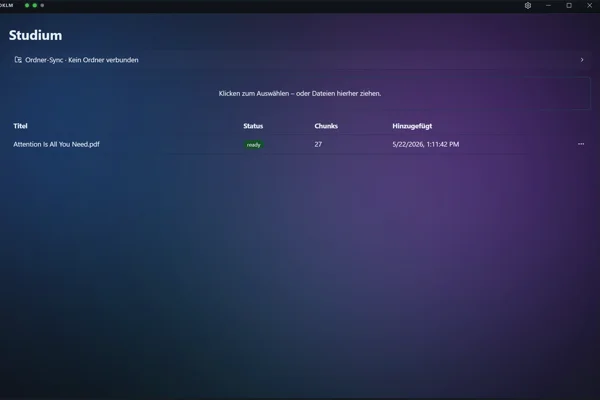
- Step 1
Drag documents into the vault
PDF, Markdown, text, or code by drag and drop. The bundled embedding model indexes locally. Vector storage is encrypted by default; original files stay unchanged.
- Step 2
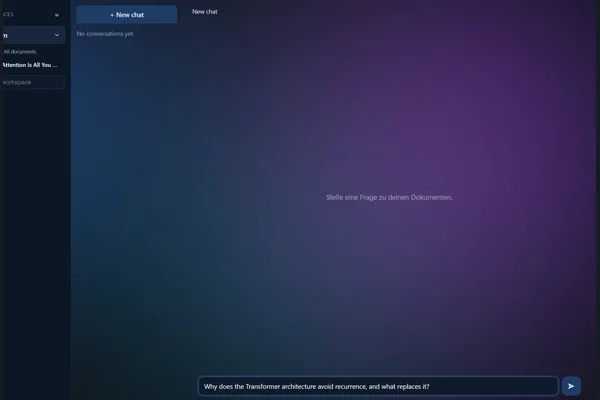
Ask in natural language
Ask about your documents. With the bundled language model, your question and document context stay on your machine.
- Step 3
Verify the source — click straight through
Click a citation to open the original passage and check whether it supports the claim.
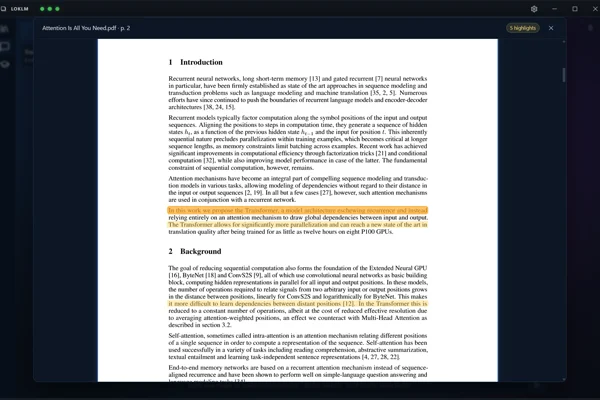


Answers that name their source.
Clickable references help you compare claims with the original passages. They do not guarantee that an answer is supported: the model can make mistakes or overlook conflicting sources.
See the architecture
Encrypted on your device.
Argon2id key derivation, AES-256-GCM, and a separate key per workspace. Your password or the 18-word recovery phrase unlocks the local vault.
See the architecture
No network, no problem.
With the bundled models, inference, the index and encryption stay local. After downloading the models, you can use these functions without network access.
See the diagram
Learn from your own material.
Generate quizzes from your documents, summarise long texts, and get help while writing — on your device with the bundled models.
See the features
Translate without the cloud.
Translate selected text or whole documents with the selected language model. The bundled model keeps text local; a consented external Ollama server receives the text when selected.
See the features
-
Fully offline
The bundled models process content locally. No cloud account or telemetry; an external Ollama server requires your explicit consent.
-
Clickable citations
Clickable citations open the original passage in your documents and help you check answers yourself.
-
PDF, Word, code & more
Import PDF (including scanned, via OCR), Word (DOCX), Markdown, text, HTML, and source code — organised into workspaces.
-
Encrypted vault
Argon2id key derivation and AES-256-GCM for the vault. Your password or the 18-word recovery phrase unlocks the master key; each workspace database has its own key.
-
Your data stays with you
The vault and workspace databases are encrypted on your device. Original files stay unchanged. With the bundled models, their contents are not sent to an AI server.
-
Source-available
MIT licence. Audit, fork, contribute — the full source is on GitHub.
-
Local translation
Translate documents and passages with the selected language model. With the bundled model, the text stays local.
-
Audio transcription
Transcribe audio locally with Whisper, including speaker separation — save the transcript into a workspace and query it like any document.
-
Search your codebase
Index whole repositories with code-specialised embeddings; answers cite the file and line (e.g. auth.ts:88), with folder sync.
-
Study, summarise, write
Generate quizzes and summaries from your documents and use the writing assistant — locally with the bundled models.
Where your data lives — and where it does not.
The data flow with the bundled models: document contents stay on your device. Optional external Ollama servers that you explicitly approve are not shown in this local workflow.
- Argon2id password hashing
- AES-256-GCM encryption
- 18-word recovery phrase
- No telemetry, no account
Your documents. Your everyday work.
Work with the documents you already have. These example questions suggest a starting point; always check answers against the original passages.
- Lawyer
“Where is the cap rate clause in the lease?”
→ Check the clause in the original contract
- Research & study
“Summarise the methodology across these three papers.”
→ Read the methods in each original paper
- Consulting & independent work
“What did the client commit to in the Q3 review?”
→ Compare commitments with the approved notes
- Small businesses
“What steps does our handbook give for handling a return?”
→ Check the process in the current handbook
- Developer
“How is the auth middleware configured in this codebase?”
→ Check the explanation against files and callers
A useful first session with your own documents.
Start with a small document you already know. Learn the workflow and check the answers against something you can judge yourself.
All guides and background articles-
Ask about a PDF and check the sources
From import to the original passage: a practical guide with example questions and a source-checking template.
Read the PDF guide -
Will local AI fit your computer?
Understand RAM, graphics memory and context length, including what to expect from a GPU with 4 GB.
Read the hardware guide
Download
Latest release. Verify the SHA-256 checksum before installing.
Version
v0.7.4
Released
2026-10-09
windows
401 MB
Show checksum
LokLM-x64.exe (401 MB)
cdc416d82b7d2425531fb63593c82ee5e623b59b7fba69ddab297ad08744c527 macos
5.7 MB
Show checksum
LokLM-mac.dmg (5.7 MB)
9f58662afcef1c8828a0fd755085204706aba1c29fe933cd319bde7f9c0440c1 linux
365 MB
Show checksum
LokLM-Setup-linux-x64.run (365 MB)
7606a6c6f56e19ed5f1a64c53922a77556de8c71f4b3136379f4997a47e97f31 Show checksum
LokLM-Setup-linux-x64.deb (3.3 MB)
3fff3192dd9bdc3eb3cf55dc160a1916237bdd1d2d2b95440dc70e72aba8e2da info During setup you download one model edition — about 4–8 GB depending on your choice (Lite / Standard / Pro). A stable connection is recommended.
System requirements
Windows 10/11, macOS, or Linux (64-bit)
RAM
12 GB RAM (16 GB for Pro), supported GPU
Disk
~10 GB free disk space
Common questions.
Is LokLM really offline?
Yes, with the bundled models LokLM works offline after the model download. Downloads and updates need a connection. You can optionally use Ollama: an external server requires your explicit approval of its destination address. Depending on the selected provider, questions, document passages for chat or embeddings, and translation text are sent there.
How big are the models, and where do they come from?
At setup you pick an edition: Lite (Qwen3.5-4B, ~3.6 GB, for integrated graphics / 12 GB RAM), Standard (Qwen3.5-4B, ~4 GB, recommended), or Pro (Qwen3.5-9B, ~7 GB). These are download sizes, not VRAM requirements. The edition also includes an embedding model (BGE-M3 for Lite, Qwen3-Embedding for Standard and Pro) and BGE Reranker v2-M3. On small GPUs, Auto leaves the reranker disabled.
Can I bring my own model (GGUF)?
Yes. LokLM runs GGUF models locally through llama.cpp — drop your own GGUF files into the model directory and pick them in settings. Alternatively, select Ollama for chat, embeddings and optional reranking. A server on another machine requires your explicit consent.
Does it need a GPU?
The bundled AI models require a supported integrated or dedicated GPU with a working driver; CPU-only inference is disabled. The language model can run partly on the GPU and partly on the CPU. On 4 GB GPUs, chat and embedding models are swapped as needed. Whether a model fits and how fast it runs depend on the model, context length and free memory. CUDA is optional for supported NVIDIA GPUs.
Where are my documents stored?
The vault, workspace databases and generated texts are encrypted in the LokLM data folder. Vector storage is encrypted by default; while in use it has a local plaintext working directory, which is encrypted again when you lock the vault. You can choose permanently unencrypted vectors for non-sensitive collections. Imported original files stay in their existing location and are not modified or encrypted by LokLM.
Is LokLM as smart as ChatGPT or Claude?
No. Cloud models run on orders of magnitude more hardware. LokLM is optimised for something different: privacy, citations into your own documents, and fully offline use. For open knowledge questions without context, cloud models remain better — LokLM is strong when the answer is in your own files.
How do I back up my data?
Lock the vault or quit LokLM before copying its data folder. Back up imported original files separately. If you selected unencrypted vector indexes, the backup includes those unencrypted files too.
What happens if I lose my password?
You can recover the vault with your 18-word recovery phrase. Without either, the vault cannot be opened — by design.